Jira project health check

Is your Jira project really healthy?

Find hidden issues. Improve your project health. Clean up Jira.
Link Healthcheck finds circular dependencies, stale blockers, empty epics and orphan issues, scores your project from 0 to 100, and fixes the common problems in one click.

Free for teams up to 10 users · Jira Cloud

Link Healthcheck overview: health score 69 At risk, 75 open findings including 2 critical, 232 open issues analysed
Why Link Healthcheck

Stop hunting for broken links by hand

Save time

One scan replaces hours of searching through issue links, epics and boards.

Trust your data

Reports and boards are only as reliable as the links behind them. See what is wrong before it skews your numbers.

Stay in control

Nothing changes until you click. You review every proposed fix before it is applied.

See it in action

A real Jira project, scanned and cleaned up in under a minute.

Watch the demo video
Find

The problems a board never shows you

Your board can look clean while the links underneath are broken. Link Healthcheck reads your project (up to its 2,000 most recently updated issues per scan), runs 8 checks and lists what is wrong, sorted by severity.

Circular dependencies

Issues that block each other in a loop, so none of them can start.

Stale blockers

Issues blocked by work nobody has touched for a long time, or still "blocked by" issues already Done.

Empty or finished epics

Epics with no child issues, or epics still open when every child is Done.

Orphan issues

Bugs linked to nothing, and open issues under a parent that is already closed.

One report

Every finding, with its severity and impact

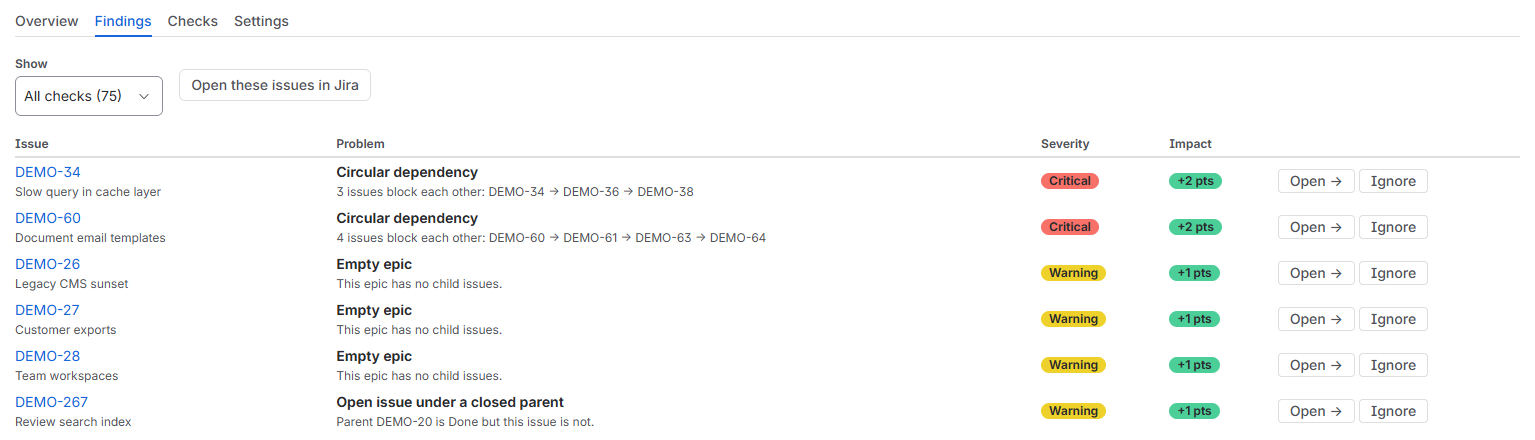
Each line names the issue, explains the problem in plain words and shows how many points fixing it adds to your score. Open it in Jira or ignore it.

Findings list: two circular dependencies marked Critical, empty epics marked Warning
Real scan of our demo project: 390 issues, 232 of them open.
10 problems can be fixed in one click: close finished epics and remove stale blocker links
You see every change before it is made.
Fix

Clean up your Jira backlog in one click

Two kinds of problems can be fixed in one click: obsolete "blocks" links to issues already Done, and epics whose child issues are all Done. Fix them one by one or up to 20 at once. Every change is listed for you to confirm, and it is made with your own Jira account. For everything else, open the issue in Jira and fix it your way.

Improve

How it works

  1. InstallAdd Link Healthcheck to Jira Cloud from the Atlassian Marketplace.
  2. Run the health checkOpen it from your project. The scan takes seconds.
  3. Review the findingsStart with the critical ones. The score shows what to fix first.
  4. Clean upFix eligible problems in one click, or open the issue in Jira and fix it your way.
69At riskhealth score of our demo project (390 issues, 232 open)
75findings, 2 of them critical
10problems fixable in one click
Trust

Built on Atlassian Forge, for Jira Cloud

Your data stays in Atlassian

The app runs on Atlassian's own platform. It only keeps your settings, ignored findings and score history. Read the privacy policy.

Nothing changes without you

The scan only reads. A fix happens only when you click it, after you have seen exactly what will change. Settings and "Ignore" are reserved for project administrators.

Permissions requested

  • read:jira-work to scan issues and links
  • write:jira-work only for the fixes you confirm
  • storage:app for settings, ignored findings and score history

Documentation and support

Read the documentation or contact support, Monday to Friday, 9:00–17:00 CET.

FAQ

Questions

How much does it cost?
It is free for teams up to 10 users. Larger teams pay per user through the Atlassian Marketplace, with a free trial.
Which Jira does it work with?
Jira Cloud only. It is not available for Jira Data Center or Server.
How is the score calculated?
The score starts at 100 and goes down with each open finding, weighted by its severity and the size of the project. Each finding shows how many points fixing it adds back.
Which problems can be fixed in one click?
Obsolete "blocks" links to issues that are already Done, and epics whose child issues are all Done. Every other finding opens the issue in Jira so you can decide.
How large a project can it scan?
Each scan reads up to the 2,000 most recently updated issues of the project.
Will it change my issues?
Only when you click a fix. Removing a link leaves both issues unchanged. Closing an epic moves it to Done, and only when all its child issues are already Done.
Who builds it?
GC Consulting, an Atlassian Marketplace partner based in Munich, Germany.

Find. Fix. Improve.

Give your Jira project a health check today. It is free for teams up to 10 users.